Branding & themes
Use Colours & Theme in the poll editor to choose the option colours, chart layout, background and voter count. A colour palette and a chart style are separate choices: the palette sets the colours, while the style sets the layout.
Choose a palette
Select a palette under Chart Theme, or click Preview Colour Palettes to compare them. The preview lets you try light and dark backgrounds before clicking Apply. Its background toggle is for comparing colours; set your saved chart background separately below.
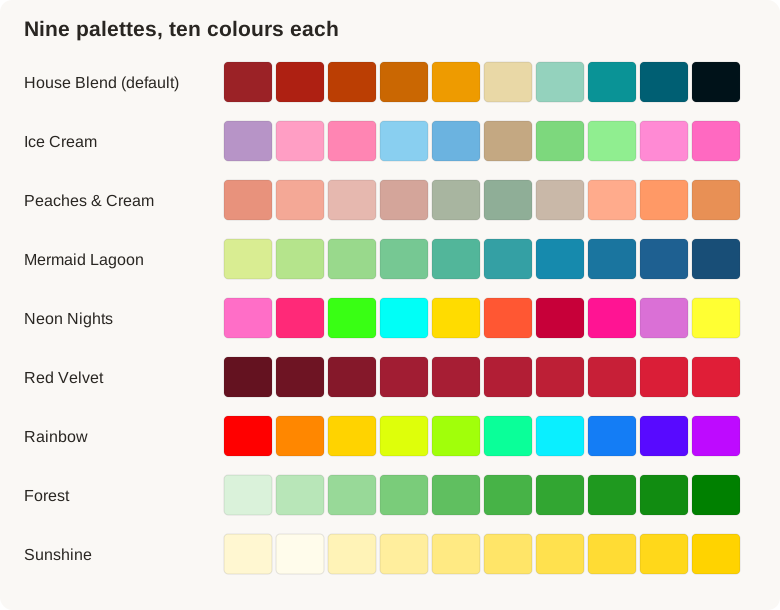
| Palette | Colour character | Match Palette background |
|---|---|---|
| House Blend (default) | Reds and warm amber through to teal and deep blue | Light |
| Ice Cream | Playful pinks, purples, blues and greens | Light |
| Peaches & Cream | Soft peach, muted pink and sage | Light |
| Mermaid Lagoon | Yellow-green through teal to deep blue | Light |
| Neon Nights | Bright pink, green, cyan and yellow | Dark |
| Red Velvet | A range of deep to bright crimson | Light |
| Rainbow | A vivid spectrum of colours | Light |
| Forest | Pale mint through to strong green | Dark |
| Sunshine | Cream and pale yellow through to gold | Dark |
Applying a palette recolours the options already in your poll. If you want individual overrides, apply the palette first, then use each answer's swatch. After changing the palette through the selector, Undo palette change is available to restore the previous option colours.
Separate neighbouring colours
Re-order colours for high contrast redistributes the current colours to put lighter and darker choices beside one another. It changes colour assignment, not answer order. Reset colour order applies the selected palette's standard order again, including replacing individual colour overrides.
Use readable answer labels as well as colour, so people do not have to identify an option by its shade alone.
Chart backgrounds
| Setting | What it does |
|---|---|
| Match Palette | Uses the light or dark background associated with your palette. The selector shows which one applies. |
| Custom Colour | Lets you choose an exact background colour with the colour picker. |
| Pick from slide | Opens a colour-sampling control so you can choose a colour from your slide. If sampling is unavailable, use Custom Colour. |
| Transparent | Removes the chart background so the slide design shows through. |
A transparent chart still needs contrast between its text, data and the slide underneath it. Check the preview over the actual slide background rather than judging the colours in isolation.
The Cover background setting in Flow controls the screen that hides results before a reveal. It is separate from the chart background, with Dark, Light and Match chart background choices.
Show voter count
Show voter count is on by default. It adds a people-voted count to the cover and the chart; turn it off for a simpler display. For polls allowing several votes, the count increases once someone has cast their full allowance. It is a count of completed participants, not the total number of selections across the options.
Default theme when creating an event
Open Default Theme (Optional) on the first event screen to choose a starting palette and background for new charts. You can choose Match Palette, Custom Colour or Transparent there. Individual polls can then use their own palette, background and chart style.
Choose your defaults before building the deck, then inspect each poll as you add it. Changing one poll's theme does not restyle every other poll.
Try a few combinations
| Purpose | Starting combination |
|---|---|
| Clear business comparison | Horizontal bars with House Blend and a light background |
| Colourful workshop | Big Pop with Ice Cream |
| Dark slide design | Bold Flat with Neon Nights and Match Palette |
| A calm visual treatment | Editorial Grid with Peaches & Cream |
| Make individual votes visible | Blocks with a palette whose options are easy to distinguish |
| An expressive closing result | Rainbow chart style with Mermaid Lagoon or the Rainbow palette |
These are starting points. Check the question, labels and contrast in your own slide layout before presenting.
Combine the chart with your slide design
Doppio charts can sit beside your own headings, photographs and shapes. Use a matching or transparent chart background, hide the chart question when your slide already supplies it, and choose labels that make sense with the surrounding content. See finished slide examples, or follow the illustrated first-poll walkthrough.