Getting started
Doppio turns a Google Slides deck into a live, interactive room. Your audience votes from their phones and the results fill in right on your slide. This guide takes you from a fresh install to your first live poll.
Sign up and install
There is no Doppio account to create. Doppio works with the Google account you already present with, so signing in is the whole sign-up.
The Chrome extension is required for both creating content and presenting. If you only present a deck that someone has already prepared, the extension is the only install you need. To create or edit polls, timers and takeaways, install the Slides add-on as well.
For a short setup guide with both paths, visit Get started with Doppio.
1. Install the add-on
- Open any deck in Google Slides.
- Go to Extensions → Add-ons → Get add-ons and search for Doppio.
- Click Install and approve the permissions.
Once installed, Doppio lives under Extensions → Doppio → Open Doppio in every deck.
Working in a managed Workspace?
If your organisation locks down add-ons, an admin needs to approve Doppio once for everyone. Point them at the Doppio listing in the Google Workspace Marketplace.
2. Install the Chrome extension
The extension supports the editor and starts and stops live sessions. Install and enable it on every computer you use to create or present Doppio content.
- Open Doppio for Google Slides in the Chrome Web Store and click Add to Chrome.
- Click the Doppio icon in your toolbar and choose Sign in with Google.
- Use the same Google account you use for Slides.
That is the lot. The add-on, the extension and your analytics dashboard all recognise you through the same Google sign-in.
Create your first event
An event is your deck's connection to Doppio. It holds your polls, your theme, and the code your audience uses to join. One deck, one event.
- Open your deck and choose Extensions → Doppio → Open Doppio to open the sidebar.
- You will see Let's get started.... Enter an Event name. Your presentation title works well. The name appears in your results reports; your audience never sees it.
- (Optional) Open the Default Theme section to pick a colour palette and chart background now. These give new charts a starting point; each poll can use its own colours later. See Branding & themes.
- Click Create event and wait for your event code to appear.
Doppio creates your event and hands you two things:
- A 5-digit event code. Your audience types this at doppio.us to join. Use the code shown in the sidebar when inviting people to this event.
- A QR code. It points straight at your event, no typing required. Click add a QR code to this slide to open the QR panel. Choose Copy QR code, then paste the image onto your slide, or Download QR code for use in slides or handouts. The link opens the panel; it does not insert the image automatically.
One code covers the whole deck
Every poll in a presentation shares the same event code and QR. Your audience scans once at the start, and their phones follow your slides from then on.
Create your first poll
Prefer to follow along with pictures? Open Your first poll, step by step.
Polls live on slides. Move to the slide where you want one, or add a fresh slide, and open the Doppio sidebar.
- The sidebar shows Nothing on this slide yet. Under Ask the audience, choose Poll.
- Write your question. Keep it short enough to read from the back of the room.
- Add your answers. You need at least two options and can have up to ten. Drag the handle on any answer card to reorder, and use the colour swatch to give each option its own bar colour.
- Set the flow and voting rules. In Flow, choose whether results appear live, on a reveal, or on another slide. In Voting, set the time limit (30 seconds by default), votes per person and countdown visibility. See Polls & settings.
- Choose the look. Open Colours & Theme for nine palettes, six chart styles, backgrounds and the voter count. See Chart styles and Branding & themes.
- Click Save poll and let saving finish.
Doppio places a preview of your chart onto the slide. Its example numbers help you judge the layout; they are not audience votes. Size and position it like an image. After the first save, poll edits save automatically.
When you present, the live chart takes the preview's place. Results appear according to your Flow setting.
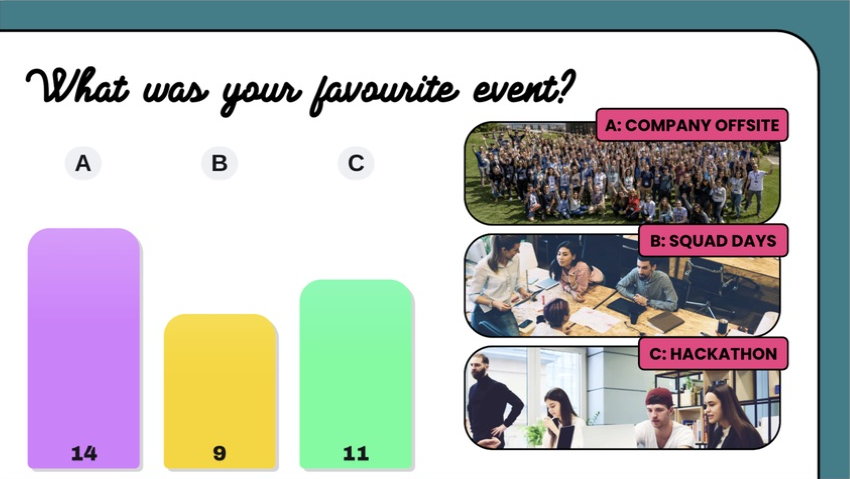
The chart fits into your slide design alongside native text and images. See Chart styles for the settings used here.
Keep it punchy
Two to four options read best on a big screen, and voters decide faster.
Choose what goes on another slide
Select a slide without a Doppio item to see these choices:
| Choice | Purpose |
|---|---|
| Poll | Ask a multiple-choice question. |
| Takeaway | Send a note or links to phones without collecting votes. |
| Timer | Put a countdown on the slide, with optional instructions for phones. |
| Results from another poll | Show an earlier question's votes here, without asking it again. |
| Copy from another slide | Start a new poll, takeaway or timer from an existing item's content and settings. This appears once there is something to copy. |
For example, ask a question on slide 1, discuss it on slides 2 and 3, then show its results on slide 4. The results-slide guide walks through that setup.
Present it
- Open your deck in Chrome and click the Doppio extension icon.
- Click Start Presentation, then present your deck exactly as you normally would, speaker notes and all.
- Your audience scans the QR, or visits doppio.us and types your 5-digit code. No apps, no accounts, no fuss.
- When you reach a poll slide, voting opens on their phones. Results appear live, on your chosen reveal, or on a separate results slide.
- When you are done, click Stop Presentation. Your results are saved and waiting in the dashboard.
You and your audience, side by slide.
Where to next
- Polls & settings: every poll setting, explained.
- Chart styles: choose between vertical bars, horizontal bars, Editorial Grid, Big Pop, Blocks and Rainbow.
- Timers: run discussions, exercises and breaks.
- Results from another poll: collect votes now and show them later.
- Reusing slides & sharing events: copy items and give colleagues event access.
- Takeaways: put links and notes on your audience's phones, no poll required.
- Running a live session: pacing a room, countdowns, and what your audience sees.
- Show day: a printable pre-flight checklist and mid-talk rescue card.
- Analytics & exports: results, session history, and CSV export.
- Branding & themes: palettes and chart backgrounds that match your deck.